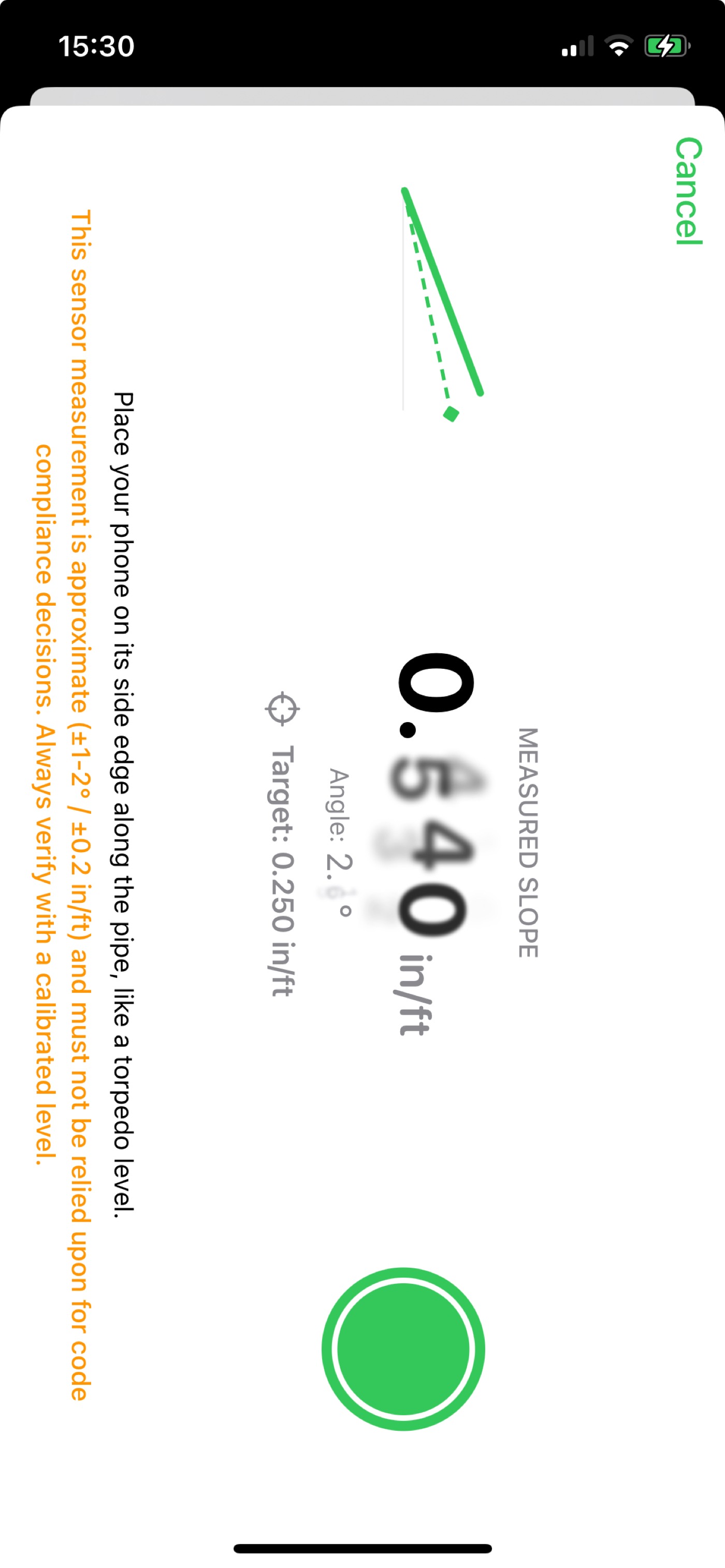
Quick answer: yes — your iPhone's tilt sensor can read pipe slope directly. With Pipe Slope Calculator, lay the phone on its side edge along the pipe like a torpedo level and read live slope in in/ft or mm/m. Set a target (say 0.250 in/ft) and the display turns green when you hit it; one tap sends the reading into a code-checked calculation.
The torpedo level in your pouch tells you "level" and maybe "2%". Your phone can tell you 0.183 in/ft, 0.87°, below your 0.250 target — and then do the code math. Here's how to use it properly, including where not to trust it.
Step by step
- Open measure mode in Pipe Slope Calculator.
- Set a target slope (optional): e.g. 0.250 in/ft for a ¼″/ft rough-in. A dashed reference line appears on screen.
- Lay the phone on its side edge along the pipe, parallel to the flow, like a torpedo level. A flat, clean section of pipe gives the best contact.
- Read the live slope — in/ft (or mm/m) plus the angle in degrees, updating in real time. When your measured slope matches the target, the display turns green.
- Tap capture to send the reading straight into the calculator — pick the pipe size and code, and you'll see immediately whether the measured grade clears the IPC, UPC or NPC minimum.
Tricks for a cleaner reading
- Use the phone's bare edge or a thin case. Bulky or uneven cases rock on the pipe and add noise.
- Measure a few spots along the run. A single reading can sit on a hump or a hanger dip; three readings tell you the true story — and expose bellies.
- Check both directions. Flip the phone 180° and re-read; a consistent sensor should show the same magnitude. A large difference means recalibrate or clean the pipe crown.
- On small pipe, bridge with a straightedge. Lay a short level or straight offcut on the pipe and set the phone on that for a longer baseline.
How accurate is it, honestly?
Phone tilt sensors are typically good to about ±1–2°, which is roughly ±0.2 in/ft. That's tight enough to catch a backward-graded branch, dial in a rough-in, or sanity-check an existing run — and not tight enough to certify a slope that's within a whisker of minimum. The app says this on the measure screen itself: sensor measurement is approximate and must not be relied on for code compliance decisions — always verify with a calibrated level. That's the right way to use it: phone for speed, calibrated level for the number that goes on the inspection.
Reference only: device sensors vary with temperature, case fit and calibration. Verify final grades with a calibrated level and confirm requirements with your local AHJ.
Why not just use the built-in level?
The iPhone's built-in level reads degrees. Drain work happens in inches per foot. Converting 1.19° to ¼″/ft in your head, on a ladder, is exactly the kind of arithmetic that goes wrong — and the built-in level has no target indicator, no capture, and no idea what the UPC thinks about your 3″ branch. Purpose-built beats general-purpose here.
Related questions
How accurate is an iPhone at measuring pipe slope?
About ±1–2° (≈±0.2 in/ft) — great for spotting problems and rough-ins, not for final compliance calls. Verify with a calibrated level.
Can the built-in Measure app do this?
It reads degrees only — no in/ft, no target slope, no capture into a code check.
Does it work offline?
Yes — sensor and calculations are fully on-device. Basements and trenches welcome.
A torpedo level that does code math
Measure, capture, verify against IPC/UPC/NPC — all offline, all on the phone already in your pocket.